
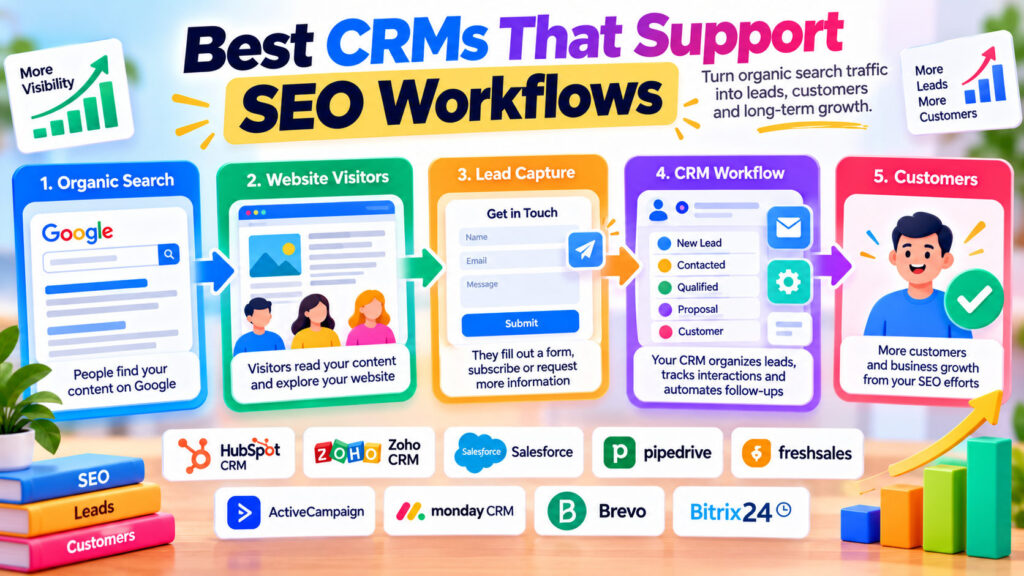
Your website is attracting visitors from Google. Your blog posts are getting impressions, your landing pages are receiving clicks, and your SEO efforts appear to be working.
But here’s an important question:
How many of those visitors actually become customers?
Getting traffic is only one part of online marketing. If your business depends on leads, inquiries, consultations, or sales, you also need to understand what happens after someone arrives on your website.
That’s where customer relationship management (CRM) software becomes useful.
A CRM can help you capture inquiries, organize leads, track customer interactions, and connect marketing activity with business outcomes.
Some CRM platforms also offer marketing automation, landing pages, forms, analytics, and integrations that make them particularly useful for SEO-driven businesses.
In this guide, we’ll explore nine CRM platforms that can support SEO workflows, explain their strengths and limitations, and help you choose the right option for your business.
What Is a CRM, and How Does It Support SEO?
CRM stands for Customer Relationship Management.
CRM software helps businesses organize information about prospects and customers, manage sales opportunities, and track interactions over time.
Typical CRM features include:
- Contact and lead management
- Sales pipelines
- Website forms
- Lead assignment
- Email communication
- Marketing automation
- Customer interaction history
- Reporting and analytics
- Integrations with other business tools
Can CRM Software Improve Google Rankings?
Not directly.
A CRM isn’t a replacement for keyword research, technical SEO audits, useful content, or website optimization.
However, it can support an SEO strategy by helping you understand whether organic visitors become valuable leads and customers.
For example, imagine someone finds your website through a Google search, reads an article, and submits a consultation request.
With suitable tracking and CRM integration, you may be able to connect that inquiry to the visitor’s acquisition source and follow its progress through your sales pipeline.
That gives you information that rankings alone cannot provide.
SEO helps people discover your business. CRM software helps you manage the relationships and opportunities that follow.
1. HubSpot CRM — Best for Integrated SEO and Inbound Marketing
Website: https://www.hubspot.com/
HubSpot is one of the most recognizable CRM and inbound marketing platforms.
Its ecosystem includes customer management, marketing tools, website features, forms, automation, and reporting.
Key features
- Contact and company management
- Deal pipelines
- Website forms
- Lead capture
- Marketing automation on eligible plans
- Reporting and attribution features
- Content and website management products
- SEO-related recommendations in supported HubSpot products
How HubSpot supports SEO workflows
Suppose your business publishes educational articles designed to attract potential customers.
A visitor discovers an article through Google, explores your services, and completes a contact form.
HubSpot can help you store that contact, manage follow-up activity, and track the resulting opportunity.
With the appropriate products, settings, and tracking, you can also analyze marketing performance across different acquisition channels.
Free vs. paid
HubSpot offers free CRM capabilities.
Advanced marketing automation, attribution, and certain SEO-related features may require paid products or subscriptions.
Best for
Businesses that want to connect content marketing, lead generation, and customer management within one ecosystem.
Verdict: A strong starting point for companies building an inbound marketing strategy around SEO and lead generation.
2. Zoho CRM — Best for Customizable Lead Management
Website: https://www.zoho.com/crm/
Zoho CRM provides customer management, sales automation, reporting, and integration capabilities.
It’s particularly attractive to businesses that want flexible processes without immediately adopting a large enterprise platform.
Key features
- Lead and contact management
- Sales pipelines
- Workflow automation
- Custom fields and modules
- Reporting and dashboards
- Integrations with other Zoho applications
- Connections to third-party marketing tools
How Zoho supports SEO workflows
Imagine your website has several service landing pages targeting different search queries.
You could use suitable forms and integrations to capture leads and record which service interested each prospect.
Your sales team could then prioritize and follow up with those inquiries.
Additional tracking may help distinguish organic search leads from paid advertising or referrals.
Free vs. paid
Zoho CRM offers a limited free edition, while advanced automation, analytics, and customization features require paid plans.
Best for
Small and medium-sized businesses that need customizable CRM workflows.
Verdict: A practical option for businesses that want to organize SEO-generated leads without adopting an expensive enterprise system.
3. Salesforce Sales Cloud — Best for Enterprise SEO-to-Sales Reporting
Website: https://www.salesforce.com/
Salesforce is a major CRM ecosystem used by organizations with complex sales and customer management processes.
Its capabilities extend beyond basic contact storage to advanced automation, reporting, and integrations.
Key features
- Lead and opportunity management
- Sales pipeline tracking
- Workflow automation
- Custom reporting
- Integrations and APIs
- Enterprise data management
- Marketing platform connections
How Salesforce supports SEO workflows
Consider a company selling high-value business services.
A visitor discovers a resource through organic search, downloads a guide, attends a webinar, and eventually requests a sales consultation.
With suitable integrations and attribution systems, Salesforce can help connect marketing interactions with opportunities and revenue.
This is especially useful when the buying process involves several steps and multiple people.
Free vs. paid
Salesforce is primarily a paid platform.
Pricing and capabilities depend on the products and editions selected.
Best for
Medium-sized and large organizations with complex sales processes and reporting requirements.
Verdict: Powerful for connecting marketing-generated leads with sales outcomes, but often more complex than smaller businesses need.
4. Pipedrive — Best for Managing SEO-Generated Sales Leads
Website: https://www.pipedrive.com/
Pipedrive is a sales-focused CRM built around visual pipelines and opportunity management.
Its main strength is helping teams track leads as they move through a sales process.
Key features
- Visual sales pipelines
- Contact and organization management
- Lead tracking
- Activity reminders
- Sales reporting
- Workflow automation on supported plans
- Website form and lead-generation features through eligible products
How Pipedrive supports SEO workflows
Suppose a local service business receives inquiries from organic search.
Each inquiry can enter a sales pipeline, where the team records follow-ups, proposals, and outcomes.
If lead-source information is captured correctly, the business can compare SEO-generated opportunities with those from other channels.
Free vs. paid
Pipedrive is a paid CRM with trial options. Features vary by subscription and add-ons.
Best for
Sales-driven businesses that want a straightforward way to manage inquiries and opportunities.
Verdict: A good choice when the main goal is converting SEO-generated inquiries into customers.
5. Freshsales — Best for Sales Automation and Lead Management
Website: https://www.freshworks.com/crm/sales/
Freshsales, part of the Freshworks ecosystem, provides sales CRM capabilities designed to organize leads, contacts, and opportunities.
Key features
- Contact and account management
- Sales pipelines
- Lead management
- Email integration
- Workflow automation
- Reporting
- Additional AI-assisted features on eligible plans
How Freshsales supports SEO workflows
Imagine a business publishing blog content to generate service inquiries.
When visitors complete a website form, an integration can create or update CRM records.
The sales team can then follow up and record whether the inquiry resulted in a qualified lead or completed sale.
This makes it easier to evaluate the business value of different landing pages and marketing channels.
Free vs. paid
Freshsales has offered free and paid editions, with plan availability and feature limits subject to change.
Best for
Small and growing sales teams seeking lead management and automation.
Verdict: Worth considering when you want a sales-oriented CRM with opportunities for workflow automation.
6. ActiveCampaign — Best for SEO Lead Nurturing and Email Automation
Website: https://www.activecampaign.com/
ActiveCampaign focuses on marketing automation, email marketing, and customer experience workflows, with CRM capabilities available through relevant products and plans.
It’s particularly useful for businesses that need to nurture leads over time.
Key features
- Email marketing
- Contact segmentation
- Marketing automation
- Lead scoring on eligible plans
- CRM and sales features through supported offerings
- Forms and integrations
- Customer journey workflows
How ActiveCampaign supports SEO workflows
Suppose someone discovers your website through an educational blog post and subscribes to a newsletter.
Instead of immediately trying to sell something, you could send a helpful sequence of relevant educational emails.
Over time, subscribers may become interested in your products or services.
ActiveCampaign can help organize those interactions and automate appropriate follow-up messages.
Free vs. paid
ActiveCampaign is primarily a paid platform, with available trials and plan features varying.
Best for
Businesses that use content marketing to attract leads and email automation to nurture them.
Verdict: Particularly useful when your SEO strategy relies on educational content and longer customer journeys.
7. monday CRM — Best for Collaborative Marketing and Sales Workflows
Website: https://monday.com/crm/
monday CRM combines customer management with configurable workflows and collaboration features.
Its visual approach can appeal to teams that want to coordinate marketing and sales activities.
Key features
- Lead and contact management
- Customizable pipelines
- Workflow automation
- Dashboards and reporting
- Team collaboration
- Integrations
- Custom fields and processes
How monday CRM supports SEO workflows
Imagine a marketing team responsible for publishing landing pages, managing campaigns, and passing qualified inquiries to sales.
A configurable CRM workflow can help organize those handoffs.
For example, an inquiry generated from a search-optimized service page can be assigned to the appropriate team member.
The team can then track its progress and outcome.
Free vs. paid
monday CRM is primarily a paid product, with pricing and trial availability dependent on the current offering.
Best for
Teams that want flexible workflows connecting marketing activity and sales operations.
Verdict: Useful for organizations where collaboration and customizable processes matter as much as traditional CRM features.
8. Brevo — Best for Budget-Friendly Lead Capture and Email Marketing
Website: https://www.brevo.com/
Brevo combines email marketing, contact management, automation, and other customer communication features.
It’s particularly relevant to businesses that want to maintain relationships with visitors who discover their websites.
Key features
- Contact management
- Email campaigns
- Signup forms
- Contact segmentation
- Marketing automation on eligible plans
- Reporting
- Additional sales and communication products
How Brevo supports SEO workflows
Suppose your website publishes tutorials that attract organic visitors.
You could offer a relevant newsletter or educational resource.
Visitors who subscribe can become contacts in Brevo, where you can organize and communicate with them according to their interests.
Free vs. paid
Brevo offers a free plan for selected email and contact management features.
Advanced automation, sending allowances, and other capabilities may require paid subscriptions.
Best for
Small businesses, bloggers, and content-focused websites looking for affordable email marketing and contact management.
Verdict: A useful option for turning relevant organic traffic into an ongoing audience relationship.
9. Bitrix24 — Best for CRM and Business Workflow Management
Website: https://www.bitrix24.com/
Bitrix24 combines CRM functionality with collaboration, task management, and business process tools.
Its broader approach can appeal to organizations that want several operational features in one system.
Key features
- Contact and lead management
- Sales pipelines
- Tasks and projects
- Team collaboration
- Automation features
- Reporting
- Website and form-related tools in supported plans
How Bitrix24 supports SEO workflows
A company could use website forms to capture inquiries and then manage follow-up tasks inside its CRM.
For example, leads from different service pages could be assigned to appropriate sales representatives.
Marketing and sales teams could also coordinate work using shared tasks and workflows.
Free vs. paid
Bitrix24 offers a free tier with restrictions.
Advanced CRM, automation, storage, and collaboration capabilities may require paid plans.
Best for
Small and medium-sized teams seeking CRM functionality alongside operational collaboration tools.
Verdict: Worth evaluating if you want an integrated business workspace rather than a narrowly focused sales CRM.
Quick Comparison: Best CRMs for SEO Workflows
| CRM Platform | Best For | Free Access |
|---|---|---|
| HubSpot | Inbound marketing and lead attribution | Free CRM; advanced features paid |
| Zoho CRM | Customizable lead management | Limited free edition |
| Salesforce | Enterprise reporting and sales processes | Primarily paid |
| Pipedrive | Sales pipeline management | Trial / Paid |
| Freshsales | Sales automation | Free and paid options |
| ActiveCampaign | Email nurturing and automation | Trial / Paid |
| monday CRM | Collaborative workflows | Trial / Paid |
| Brevo | Email marketing and contact management | Limited free plan |
| Bitrix24 | CRM and business collaboration | Limited free tier |
Plan limits, pricing, integrations, and feature availability may change. Review each provider’s current documentation before subscribing.
How to Connect SEO Traffic With Your CRM
Choosing a CRM is only the beginning.
To understand the business value of organic search, you need a practical tracking and follow-up process.
Step 1: Identify your important landing pages
Use Google Search Console and Google Analytics to find pages attracting organic visitors.
Pay attention to pages that could generate inquiries, registrations, or sales.
Step 2: Create useful conversion opportunities
Not every page needs an aggressive sales form.
Depending on the content, a suitable next step might be:
- Requesting a consultation
- Subscribing to a newsletter
- Downloading a relevant resource
- Registering for a demonstration
- Contacting your business
- Creating an account
Step 3: Connect forms to your CRM
Use native integrations, supported plugins, or APIs to send form submissions into your CRM.
Ensure that visitors understand what information you’re collecting and why.
Step 4: Capture acquisition information
Where technically feasible and privacy-compliant, record useful marketing attribution data.
This might include:
- Landing page
- Referring source
- Campaign information
- Form submission page
- Lead creation date
Be careful when interpreting source information. A lead may interact with your website through several channels before converting.
Step 5: Organize your leads
Use CRM fields, tags, or pipelines to distinguish inquiries by service, interest, or qualification status.
Step 6: Follow up appropriately
Create a consistent process for responding to inquiries.
Automation can help, but communications should remain relevant and respect consent and privacy requirements.
Step 7: Measure outcomes
Review how many leads become qualified opportunities or customers.
Where reliable attribution data exists, compare results across landing pages and acquisition channels.
Example: Measuring SEO Leads With a CRM
Imagine a WordPress business website that receives inquiries from three service pages.
| Landing Page | Organic Inquiries | Qualified Leads | Customers |
|---|---|---|---|
| WordPress Development | 40 | 15 | 5 |
| Website Maintenance | 25 | 12 | 7 |
| SEO Consulting | 30 | 10 | 3 |
Illustrative data only.
The WordPress Development page generates the most inquiries.
However, the Website Maintenance page generates more customers.
This suggests that traffic volume alone doesn’t tell the complete story.
A CRM can help businesses investigate which inquiries are most valuable and how effectively they’re converted.
Best CRM Features to Look for When SEO Matters
Not every CRM needs built-in SEO auditing.
For many businesses, the most useful features are those that help connect search traffic with outcomes.
Website form integrations
Your CRM should work with your website’s contact forms and lead-generation systems.
Custom lead-source fields
You may want to record acquisition channels, landing pages, or campaign information.
Marketing attribution
Some platforms offer reporting that connects marketing interactions with leads and revenue.
Advanced attribution often requires additional products, integrations, or paid plans.
Sales pipeline management
A pipeline helps you see what happens after a lead enters your business.
Automation
Useful automation can reduce repetitive work, such as assigning leads or creating follow-up reminders.
Reporting
Look for reports that help you measure lead quality, conversion rates, and sales outcomes.
Privacy and consent controls
Your CRM should support responsible handling of personal information and relevant consent requirements.
CRM and SEO: Common Mistakes to Avoid
1. Assuming a CRM automatically improves rankings
CRM software doesn’t replace technical SEO, keyword research, or content quality.
2. Tracking only website traffic
Organic visits matter, but businesses should also consider leads, customers, and other meaningful outcomes.
3. Capturing leads without source information
Without useful attribution data, it can be difficult to evaluate marketing channels.
4. Treating attribution as perfectly accurate
Cookie restrictions, consent choices, device changes, and multiple visits can make attribution incomplete.
5. Automating every customer interaction
Automation should support helpful communication rather than overwhelm prospects with irrelevant messages.
6. Choosing an overly complicated CRM
A smaller business may benefit more from a simple, reliable workflow than a platform with hundreds of unused features.
7. Ignoring privacy requirements
Collect only the information you need, explain its use, and follow applicable data protection requirements.
Which CRM Is Best for Your Business?
For inbound marketing: HubSpot is a strong candidate.
For small businesses wanting customization: Zoho CRM is worth evaluating.
For enterprise sales and reporting: Salesforce offers extensive capabilities.
For visual sales pipelines: Pipedrive is a practical option.
For email-based lead nurturing: ActiveCampaign or Brevo may be suitable.
For collaborative teams: monday CRM or Bitrix24 can be useful.
For growing sales teams: Freshsales deserves consideration.
Your ideal choice depends on your business model, integrations, budget, and reporting needs.
Do Bloggers and Utility Websites Need a CRM?
Not every website needs one.
If your website earns primarily through advertising, and visitors use its tools without registering or contacting you, a full CRM may add little value.
Google Search Console and Google Analytics might be sufficient for monitoring search visibility and visitor behavior.
However, a CRM becomes more relevant when your website begins generating:
- Service inquiries
- Business partnerships
- Affiliate relationships
- Newsletter subscribers
- Consulting leads
- Customer accounts
- Direct sales opportunities
The key is to choose software based on actual business needs rather than adopting tools simply because they’re popular.
Final Thoughts: Connect SEO Performance With Business Results
SEO can help attract the right people to your website.
CRM software can help you understand and manage what happens next.
Together, they can support a more complete view of your marketing efforts—from organic search discovery to lead generation and customer relationships.
But remember that a CRM isn’t an SEO ranking tool.
Its real value lies in helping businesses organize inquiries, improve follow-up, and measure meaningful outcomes.
Choose a CRM that fits your business, connect it to your website responsibly, and use the information to make better marketing decisions.
And if you’re looking for useful online utilities, explore WebToola for free calculators, converters, developer tools, and everyday digital resources.
Frequently Asked Questions
What is the best CRM for SEO?
HubSpot is a strong option for businesses combining inbound marketing, lead generation, and CRM workflows. However, the best choice depends on your requirements, integrations, and budget.
Can CRM software improve Google rankings?
Not directly. CRM software supports lead management, marketing attribution, and customer relationships. Technical SEO, useful content, and other search-related factors influence rankings.
Is HubSpot CRM free?
HubSpot offers free CRM capabilities. Advanced marketing automation, reporting, and certain SEO-related features may require paid products.
Which CRM is best for WordPress?
HubSpot, Zoho CRM, Brevo, and several other platforms can work with WordPress through plugins, forms, APIs, or third-party integrations. The best option depends on your workflow.
Can I track organic search leads in a CRM?
Yes, with suitable website tracking, forms, integrations, and attribution settings. However, acquisition data may be incomplete due to privacy controls and multi-channel customer journeys.
Do small businesses need expensive CRM software?
Not necessarily. Free or lower-cost CRM options can support basic lead management. More advanced systems become useful when business processes grow more complex.
What’s the difference between CRM and SEO software?
SEO software focuses on search visibility, keyword research, technical optimization, and search performance. CRM software focuses on contacts, leads, customer interactions, and sales processes.
Is Google Analytics a CRM?
No. Google Analytics is a website and app analytics platform. It can help measure visitor behavior, while a CRM manages customer and lead relationships.
Should a blog use a CRM?
A blog that primarily earns advertising revenue may not need a CRM. A blog that generates consulting leads, subscriptions, or direct sales may benefit from one.