
You’ve written a great article. Your research is solid, your headings are organized, and you’re confident that visitors will find it useful.
You publish it, wait for Google to discover it, and then check your search performance.
Nothing exciting happens.
Sound familiar?
Sometimes the problem isn’t the topic itself. Your content might need clearer headings, a more descriptive title, better internal links, or improvements that make it easier for search engines and visitors to understand.
That’s where on-page SEO checkers can help.
These tools examine individual web pages and highlight opportunities to improve content structure, metadata, keyword targeting, internal linking, and other important SEO elements.
But with so many tools available, which ones are actually worth using?
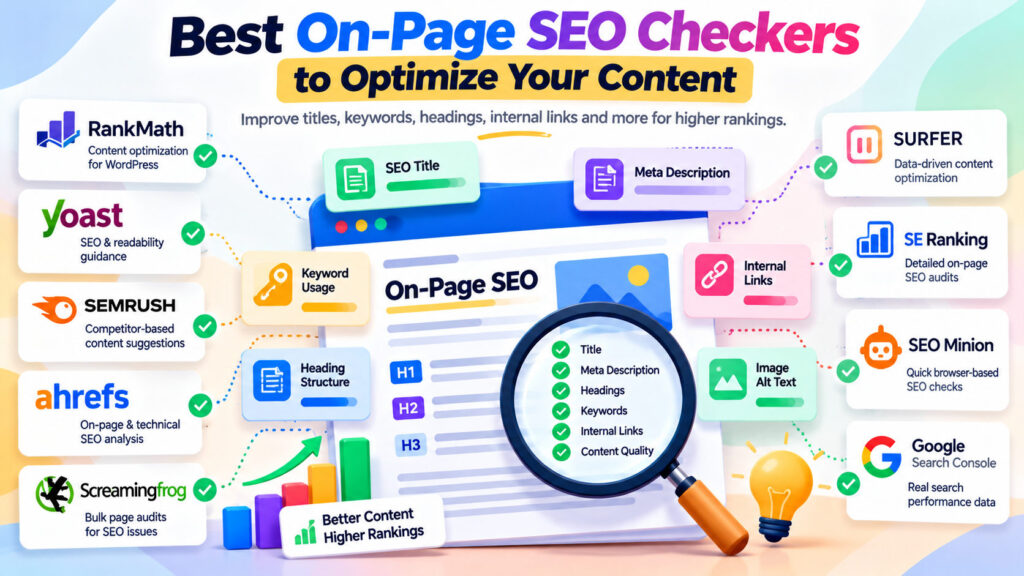
In this guide, we’ll compare nine popular on-page SEO checkers, including free and paid options, and explain how to use them to improve your content without falling into the trap of chasing meaningless SEO scores.
What Is On-Page SEO?
On-page SEO is the practice of improving individual web pages to make their content more useful, accessible, and understandable to search engines and visitors.
Unlike technical SEO, which focuses on website infrastructure and crawling, on-page SEO concentrates primarily on what appears on individual pages and how that information is organized.
Common on-page SEO elements include:
- Page titles and meta descriptions
- Heading structure (H1, H2, H3)
- Content quality and relevance
- Search intent
- Internal and external links
- Descriptive image alt text
- URL structure
- Keyword placement and natural language
- Content readability
On-page SEO and technical SEO overlap in areas such as internal linking, structured data, and indexability.
Why Does On-Page SEO Matter?
Search engines need to understand what a page is about and whether it satisfies a user’s search.
A clear page title, useful headings, relevant content, and meaningful internal links help communicate that information.
For example, suppose you publish a free percentage calculator.
A page containing only the calculator might work perfectly, but visitors could also benefit from a short explanation, examples, and answers to common questions.
Adding useful supporting content can make the page more informative without distracting from the main tool.
Good on-page SEO isn’t about repeating keywords. It’s about making each page genuinely useful and easy to understand.
1. Rank Math SEO — Best for WordPress Content Optimization
Website: https://rankmath.com/
Rank Math is a WordPress SEO plugin that helps website owners manage important on-page SEO elements directly from the editor.
It’s especially useful because you can optimize content while writing or editing a post.
Key features
- Focus keyword analysis
- SEO title and meta description editing
- Content optimization suggestions
- Heading and keyword checks
- XML sitemap management
- Structured data features
- Internal linking-related recommendations and tools
Free vs. paid
Rank Math offers a free version with many essential SEO features.
Paid plans provide additional functionality, including advanced analytics and other optimization capabilities.
How to use it
- Open a WordPress post.
- Enter your primary focus keyword.
- Set a descriptive SEO title.
- Write a compelling meta description.
- Review Rank Math’s suggestions.
- Make improvements that genuinely help the content.
What should you avoid?
Don’t rewrite useful sentences simply to satisfy every keyword placement suggestion.
Rank Math’s score is a helpful checklist, not a Google ranking factor.
Best for: WordPress bloggers, small businesses, and website owners.
Verdict: An excellent starting point for WordPress users who want built-in SEO guidance without paying for a separate optimization platform.
2. Yoast SEO — Best for SEO and Readability Guidance
Website: https://yoast.com/wordpress/plugins/seo/
Yoast SEO is another established WordPress plugin offering content analysis and optimization guidance.
It focuses on SEO checks alongside readability recommendations.
Key features
- SEO title and meta description controls
- Focus keyphrase analysis
- Readability checks
- Content structure recommendations
- XML sitemap support
- Schema-related features
Why it’s useful
Yoast encourages writers to consider how their content is organized and presented.
For example, it can flag lengthy paragraphs or other readability concerns.
These suggestions can be useful when editing articles for a general audience.
Free vs. paid
Yoast provides a free plugin, while premium plans unlock additional features.
Things to consider
Readability recommendations are guidelines rather than universal writing rules.
A technical tutorial might reasonably contain longer explanations than a short beginner article.
Best for: Writers who want combined SEO and readability feedback.
Verdict: A strong alternative to Rank Math, particularly for content-focused WordPress publishing.
3. Semrush On Page SEO Checker — Best for Competitive Optimization Ideas
Website: https://www.semrush.com/on-page-seo-checker/
Semrush offers an On Page SEO Checker that generates optimization ideas based on several sources of SEO data.
Its main advantage is helping you investigate opportunities beyond basic title and keyword checks.
Key features
- Content optimization suggestions
- Competitor-related insights
- Semantic keyword recommendations
- Technical improvement ideas
- User experience-related recommendations
- Optimization prioritization
Why it’s useful
Imagine you’re targeting the keyword “free online discount calculator.”
Semrush can help you investigate competing pages and identify areas worth reviewing.
However, a recommendation to include a particular phrase doesn’t automatically mean your page needs it.
Always consider whether the suggestion improves the visitor’s experience.
Free vs. paid
Semrush provides limited free access to certain features, while broader use typically requires a subscription.
Best for: SEO professionals, marketers, and website owners performing competitor-informed optimization.
Verdict: Useful when you want more detailed optimization ideas than a standard WordPress plugin provides.
4. Ahrefs Site Audit — Best for On-Page and Technical SEO Issues
Website: https://ahrefs.com/site-audit
Ahrefs Site Audit examines website pages for a wide range of technical and on-page SEO problems.
Although it’s broader than a dedicated content editor, it can reveal issues affecting individual pages.
Key features
- Missing or duplicate titles
- Meta description issues
- Heading problems
- Internal linking analysis
- Crawlability and indexability checks
- Page structure diagnostics
Why it’s useful
Suppose your website contains dozens of calculators and converters.
You may have accidentally reused the same SEO title across several pages.
A site audit can help identify these patterns more efficiently than checking each page manually.
Free vs. paid
Ahrefs provides limited free access to Site Audit for verified websites through its free tools, with expanded capabilities available in paid plans.
Best for: Website owners managing multiple pages and looking for site-wide on-page SEO problems.
Verdict: Particularly valuable for finding repeated issues across a growing website.
5. Screaming Frog SEO Spider — Best for Bulk On-Page SEO Audits
Website: https://www.screamingfrog.co.uk/seo-spider/
Screaming Frog SEO Spider is a desktop crawler that can inspect many pages and report their SEO elements.
Its strength is bulk analysis.
Key features
- Page title extraction
- Meta description checks
- H1 and H2 analysis
- Duplicate metadata detection
- Internal and external link analysis
- Canonical URL checks
- HTTP response code reporting
Free vs. paid
The free version supports crawling up to 500 URLs per crawl, with advanced features available through a paid license.
Practical example
Imagine your WordPress website has 50 blog posts.
You want to find pages with missing H1 headings, duplicate titles, or unusually long meta descriptions.
Instead of opening each post individually, you can crawl the website and review the results in a spreadsheet-style interface.
Best for: Developers, SEO consultants, and website owners who want efficient bulk analysis.
Verdict: One of the most useful tools for identifying structural on-page SEO problems across an entire website.
6. Surfer SEO — Best for Data-Assisted Content Optimization
Website: https://surferseo.com/
Surfer SEO focuses on content planning and optimization.
It analyzes competing search results and provides recommendations intended to help writers cover relevant topics.
Key features
- Content Editor
- Topic and term recommendations
- Content structure guidance
- Optimization scoring
- Content planning features
- AI-assisted writing capabilities
Why it’s useful
Surfer can help identify related concepts that commonly appear in competing content.
For example, an article about profit margin calculations might benefit from explaining markup, revenue, cost of goods sold, and common calculation mistakes.
However, including every recommended term isn’t necessary.
The content should remain accurate, focused, and natural.
Free vs. paid
Surfer is primarily a paid platform, and available plans or trial options may change.
Best for: Content teams, professional bloggers, and SEO writers producing substantial amounts of search-focused content.
Verdict: A specialized option for content optimization, but potentially unnecessary for smaller websites with limited publishing needs.
7. SE Ranking On-Page SEO Checker — Best for Detailed Page Audits
Website: https://seranking.com/
SE Ranking provides an On-Page SEO Checker designed to evaluate individual pages against target keywords and competing results.
Key features
- On-page optimization analysis
- Competitor comparisons
- Content-related recommendations
- Metadata checks
- Page structure analysis
- Technical issue detection
Why it’s useful
It combines content-oriented recommendations with technical observations.
This can help website owners distinguish between problems involving the actual article and issues involving page configuration.
Free vs. paid
SE Ranking is primarily a paid service. Trial availability and feature access depend on current offerings.
Best for: SEO freelancers, agencies, and businesses seeking structured page optimization reports.
Verdict: Worth evaluating if you need a dedicated on-page analysis platform alongside other SEO management features.
8. SEO Minion — Best for Quick Browser-Based SEO Checks
Website: https://seominion.com/
SEO Minion is a browser-based SEO utility known for helping users inspect common page elements without running a complete website crawl.
Key features
Depending on the current version and access level, its tools can assist with:
- On-page SEO analysis
- Heading inspection
- Link checking
- SERP-related analysis
- Page metadata review
Why it’s useful
Sometimes you don’t need an extensive report.
You simply want to open a page and inspect its headings, links, and basic SEO elements.
A browser-based checker can make this process convenient.
Things to consider
SEO Minion’s availability and access conditions have changed over time. Check the current provider requirements before relying on it as a free tool.
Best for: Quick manual page reviews.
Verdict: A convenient option for lightweight inspection, subject to its current access requirements.
9. Google Search Console — Best for Measuring Real Search Performance
Website: https://search.google.com/search-console/
Google Search Console isn’t a traditional on-page SEO checker.
However, it provides something extremely valuable: actual Google Search performance data for your verified website.
Instead of only evaluating whether your page follows an SEO checklist, it helps you understand how that page performs in search.
Key features
- Search queries
- Impressions and clicks
- Average search positions
- Click-through rates
- Landing page performance
- Indexing information
- URL inspection
How to use it for on-page SEO
Suppose one of your articles receives many impressions but relatively few clicks.
That might be a reason to review its title and search intent.
Or perhaps a page receives impressions for relevant queries that your content doesn’t answer clearly.
You could improve the page by adding a useful explanation or example.
Important limitation
Low click-through rates or average positions don’t automatically prove an on-page SEO problem.
Search features, competition, query mix, and user behavior can influence these metrics.
Best for: Every website owner who wants to measure SEO results rather than rely entirely on optimization scores.
Verdict: An essential free companion to any on-page SEO checker.
Quick Comparison: Best On-Page SEO Checkers
| Tool | Best For | Access |
|---|---|---|
| Rank Math | WordPress on-page optimization | Free / Paid |
| Yoast SEO | SEO and readability | Free / Paid |
| Semrush On Page SEO Checker | Competitor-based recommendations | Limited free / Paid |
| Ahrefs Site Audit | Site-wide on-page issues | Limited free / Paid |
| Screaming Frog | Bulk page analysis | Free up to 500 URLs / Paid |
| Surfer SEO | Content optimization | Primarily paid |
| SE Ranking | Detailed page audits | Primarily paid |
| SEO Minion | Quick browser checks | Access conditions vary |
| Google Search Console | Real search performance | Free |
Features, prices, and usage limits can change. Always check the provider’s current website before subscribing.
How to Perform an On-Page SEO Audit Step by Step
You don’t need all nine tools to improve a page.
Here’s a practical workflow.
Step 1: Identify your page’s main purpose
Before analyzing keywords, ask what visitors want to accomplish.
Are they looking for information, comparing products, or trying to complete a task?
The answer should influence your page structure.
Step 2: Review your SEO title
Write a clear, descriptive title that accurately represents the content.
Include your primary keyword naturally when appropriate.
Avoid stuffing multiple variations into one title.
Step 3: Improve your meta description
A meta description should summarize the page and give people a useful reason to visit.
Google may generate a different snippet based on the search query, so your description isn’t guaranteed to appear exactly as written.
Step 4: Examine your headings
Use headings to organize information logically.
A clear H1 should describe the main topic, while H2 and H3 headings can divide the content into useful sections.
Don’t force keywords into every heading.
Step 5: Evaluate content quality
Ask whether your content:
- Answers the main question
- Provides accurate information
- Includes helpful examples
- Avoids unnecessary repetition
- Is easy to understand
- Offers something useful beyond competing pages
Step 6: Check internal links
Link to relevant pages that genuinely help visitors.
For example, an article explaining percentage changes might naturally link to a percentage change calculator.
Use descriptive anchor text rather than repeatedly using vague phrases such as “click here.”
Step 7: Review images
Check that images are relevant, appropriately sized, and include descriptive alt text where needed.
Alt text should describe meaningful image content rather than serve as a place to stuff keywords.
Step 8: Test mobile usability
Open the page on a smartphone or use Chrome DevTools.
Check whether text, navigation, images, tables, and interactive elements work properly.
Step 9: Verify indexing
Use Google Search Console to check whether the page is indexed or eligible for indexing.
Investigate unexpected technical problems.
Step 10: Measure and improve
Monitor performance over time.
Use search query data and visitor needs to guide meaningful updates.
The goal is to improve the page, not merely increase an automated SEO score.
Common On-Page SEO Mistakes to Avoid
1. Keyword stuffing
Repeating the same keyword unnaturally doesn’t make content more helpful.
Write for people first.
2. Chasing perfect SEO scores
Plugin scores can identify useful issues, but they aren’t Google ranking factors.
3. Ignoring search intent
A well-optimized article may still struggle if visitors actually want an interactive tool or a product comparison.
4. Publishing duplicate or near-duplicate pages
Creating separate pages for every small keyword variation can lead to repetitive content.
Group closely related queries when one page can satisfy the same intent.
5. Overlooking internal links
Relevant internal links help visitors navigate and support search engine discovery.
6. Treating keyword density as a ranking formula
There’s no universal keyword density percentage that guarantees better rankings.
7. Ignoring performance data
Use Google Search Console to understand how visitors discover your pages and identify opportunities for improvement.
Which On-Page SEO Checker Should You Choose?
Your ideal tool depends on your website and workflow.
For WordPress beginners: Rank Math or Yoast SEO provides a convenient starting point.
For free website-wide checks: Screaming Frog’s free crawler can identify many common issues.
For competitor-informed optimization: Semrush or SE Ranking may offer useful insights.
For professional content production: Surfer SEO can assist with topic coverage and content structure.
For actual Google Search results: Google Search Console is essential.
A sensible approach is to begin with free tools and upgrade only when you need capabilities they don’t provide.
Final Thoughts: Better Content Matters More Than Better Scores
On-page SEO checkers can help you identify missing metadata, unclear headings, weak internal linking, and opportunities to improve content.
But no tool can guarantee that your page deserves to rank.
Search engines aim to present useful results that satisfy what people are looking for.
That means the strongest optimization strategy combines technical accuracy with relevant, genuinely helpful content.
Use SEO checkers as guides, not as substitutes for understanding your audience.
Start with one important page, review its weaknesses, make meaningful improvements, and measure the results.
Over time, those improvements can contribute to a stronger website and a better visitor experience.
And if you’re looking for practical online utilities, explore WebToola for free calculators, converters, developer tools, and everyday digital resources.
Frequently Asked Questions
What is an on-page SEO checker?
An on-page SEO checker analyzes individual web pages for potential optimization issues involving titles, meta descriptions, headings, content structure, links, and other SEO elements.
What is the best free on-page SEO checker?
For WordPress, Rank Math and Yoast offer useful free optimization features. Screaming Frog provides limited free website crawling, while Google Search Console helps measure actual search performance.
Is Rank Math better than Yoast SEO?
Both are capable WordPress SEO plugins. Rank Math offers a broad collection of free features, while Yoast emphasizes SEO and readability guidance. The better choice depends on your needs and preferences.
Can on-page SEO tools improve Google rankings?
They can help identify issues worth fixing, but they don’t directly improve rankings. Results depend on the quality and relevance of the changes you make, along with many other factors.
Is keyword density important for SEO?
There’s no universally recommended keyword density percentage. Use relevant keywords naturally and prioritize useful content over repetition.
Should every page have a unique SEO title?
Important indexable pages should generally have descriptive titles that distinguish them from other pages. Avoid using identical generic titles across unrelated content.
How often should I run an on-page SEO audit?
Review important pages when publishing, after substantial content changes, or when performance data suggests a meaningful opportunity. Periodic site-wide checks can also help identify repeated problems.
Do I need paid SEO tools for a small website?
Not necessarily. Free tools can cover many common optimization tasks. Paid platforms become more valuable when you need deeper competitive analysis, large-scale audits, or advanced reporting.